Introduction to
Spectra of Light
Using a spectrometer- calibration
- Never look
directly at the sun ether with your eyes or with the spectrometer that
you will build.
- After building your spectrometer find a light source and become
familiar with what your home built spectrometer can do. As we
state above, you should never look directly at the sun. The sun’s
spectrum contains ultraviolet (UV) radiation which can cause permanent
damage to your eyes.
- After you get familiar with the spectrometer, you are now ready for
the next step which is assigning the proper wavelength to the spectral
lines you are seeing. You can do that by using the spectralworkbench.org
software. Note: if this is your first time to use the software, we
recommend that you use the webcam on your laptop for first time
calibration. To be able to work with spectralworkbench.org
software you need to do the following:
1) Create a profile on spectralworkbench.org.
2) After you log in you can use the capture spectra at the top right
corner.
3) Use a fluorescent light to capture the spectrum using your
spectrometer and a camera. This picture will be used to calibrate the
software, so it can identify the wavelengths. If you run into the
saturation problem, you can compensate by carefully moving the light
to where saturation is minimized or by using a semi clear tape at the slit
side which works as light diffuser. (See our instructions.)
We also recommended that the slit in the spectrometer and the light source
be at the same height.
4) Use live capture spectra under capture spectra bottom at the top
left. A message appears asking you to allow
spectralworkbench.org to use your webcam, click OK.
5) Now adjust the line on your image from the webcam to the
brightest and clearest position of the image. Then click start capturing
spectra.
6) After you capture the image and this is your first calibration or
you want to try a new calibration. Then click calibration and follow the
instruction they give you. The fluorescent light contains mercury,
and the software compares the mercury spectrum with the lines from your
spectroscope. Below is an example of a fluorescent light spectrum
calibration.
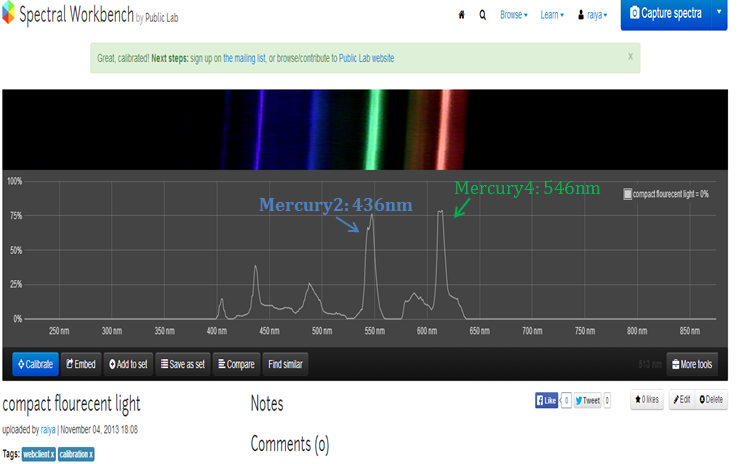
After you are satisfied with your calibration, you can try the
following:
* If you have a laser pointer(don't look with your eyes through the
spectrometer to the laser it can damage your eye), what do you think the
spectrum look like? Write your prediction? Now use your spectrometer and
the software to test your prediction.
* We provide you with different color LEDs, What do you think each LED
color will give you?
* Be creative, try to look at the spectrum of many things around you, if
you have a LED flash light, candle, you can pass light through food
coloring, honey etc.
Previous page | 1 2 3 4 | Next page